Tournament
The tournament you are working on: its settings before the start, its clock and figures while it runs, its results when it is over. The top bar above every tab belongs to it too.
What the tab shows
The tab always shows the tournament selected in the switcher at the top of the menu. Up to five tournaments can be open at once; the others keep running while you look at one.
| Situation | The tab shows |
|---|---|
| No tournament open | Where do we begin? with New tournament (it opens the single-tournament wizard in Events) and the nights Planned in Events, each with Open. |
| Not started yet | The starting point, Ready for tonight, the clock (stopped) and all settings. |
| Running | The clock, the figures of the night, the screens it is on, settings and notes. |
| Finished | The results, with what to do next. |
Before the start
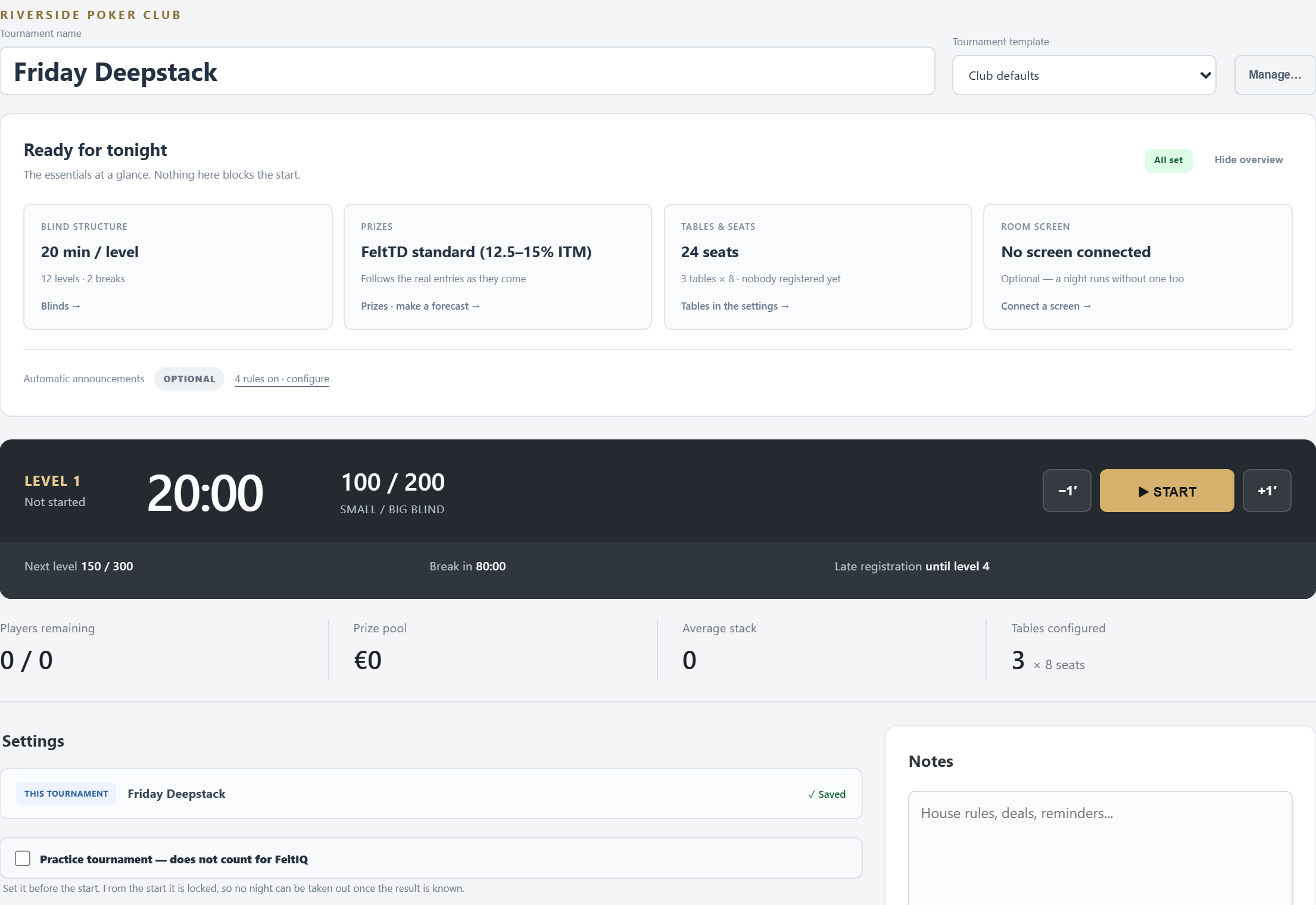
Your starting point
- Tournament name: type to rename.
- Tournament template: choose Club defaults or one of your saved tournament templates. It applies at once, without asking, and replaces the settings. Manage… lists your templates; ✕ removes one of your own (the ones that come with FeltTD stay).
Ready for tonight
The essentials at a glance. Folded, it shows a short summary and All set or how many things to check; Show opens it. Nothing here blocks the start.
- Blind structure: minutes per level, levels and breaks. Click to go to Blinds.
- Prizes: the payout model. Click to go to Prizes, also to make a forecast.
- Tables & seats: turns amber when more players are expected than there are seats.
- Room screen: on how many screens this tournament shows. Amber when a screen is online but shows another tournament.
- Automatic announcements: how many announcement rules are on; configure goes to Preferences.
Ticked Tutorial in the Events wizard? Then a three-step guide (The tournament, Entry and chips, The room) walks you through the same settings first. Show all settings leaves it.
Settings
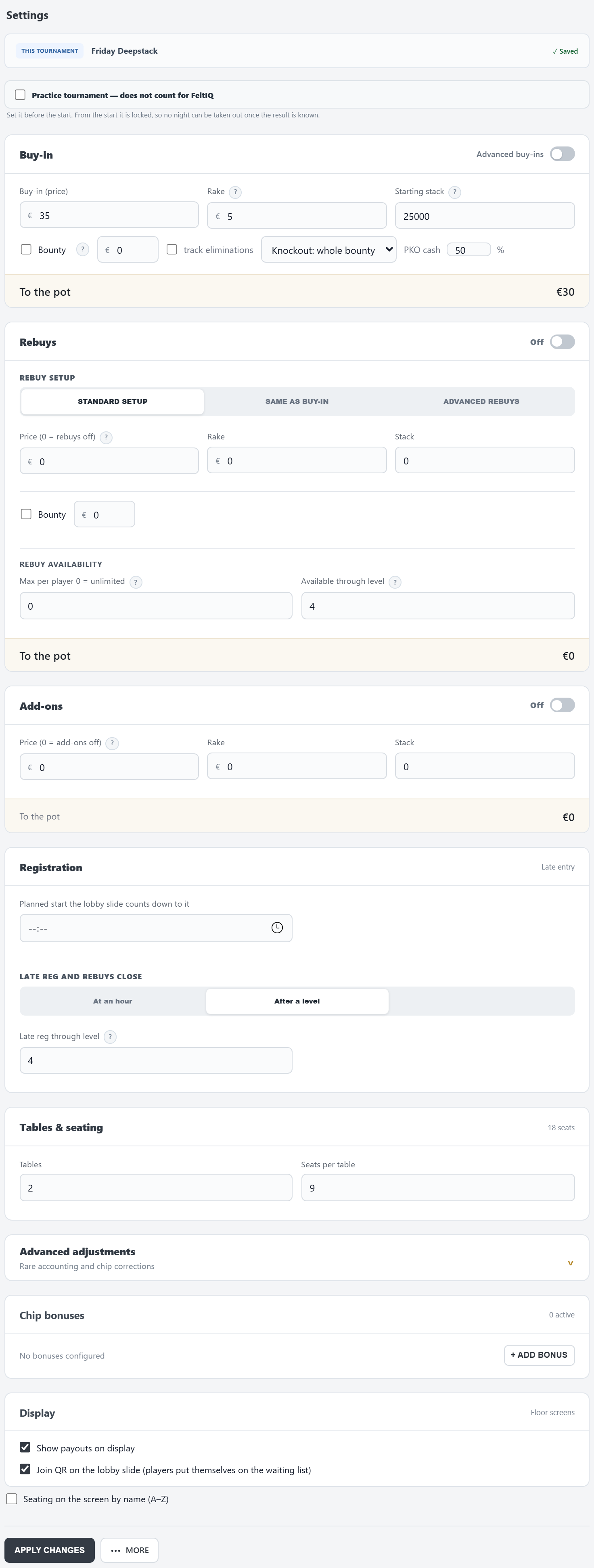
The bar on top says which tournament you are changing and whether everything is saved: ✓ Saved, or amber Not applied yet — press Apply changes.
- Practice tournament — does not count for FeltIQ: only before the start.
- Buy-in: Buy-in (price), Rake and Starting stack. With Bounty a part of each buy-in goes on the player's head: Knockout: whole bounty or Progressive (PKO) with its cash share. The line To the pot shows what reaches the prize pool. Advanced buy-ins gives several buy-in options (EDIT BUY-INS…: name, price, rake, bounty, stack; the first row is the default).
- Rebuys: the ON/OFF switch beside the heading. SAME AS BUY-IN keeps it simple, STANDARD SETUP lets you set price, rake and stack, ADVANCED REBUYS gives several rebuy options. Under Rebuy availability: the maximum per player (0 = unlimited) and until which level or hour.
- Add-ons: the same ON/OFF switch, with price, rake and stack.
- Registration · Late entry: the Planned start (the lobby slide counts down to it) and when late registration and rebuys close: At an hour or After a level.
- Tables & seating: the number of Tables and Seats per table.
- Advanced adjustments: House contribution (an amount the house adds to the prize pool, e.g. a guarantee or a sponsor) and Chip adjustment (± chips in play, for the chip check).
- Chip bonuses: named extra chips a player can get with the buy-in, ticked when they pay. + ADD BONUS adds one (a name and the chips).
- Display: Show payouts on display, Join QR on the lobby slide and Seating on the screen by name (A–Z).
A ? beside a field explains it. Money fields show your club's currency.
What saves at once, and what needs APPLY CHANGES
| Saves at once | Saves with APPLY CHANGES |
|---|---|
| The name, the template choice, Practice, the Rebuys and Add-ons switches, the three Display ticks | Everything else, the buy-in and rebuy lists and the chip bonuses included. Notes have their own SAVE NOTES. |
Prices changed after people paid? APPLY CHANGES then asks: KEEP EXISTING DEALS (the new prices count from now on) or APPLY TO EVERYONE (everything is recalculated at the new prices).
- The Rebuys and Add-ons switches lock once a rebuy or add-on was sold tonight.
- Practice tournament cannot change after the start.
- Late registration At an hour needs that hour filled in, or APPLY CHANGES refuses.
- A Progressive (PKO) bounty always tracks who made each elimination.
More
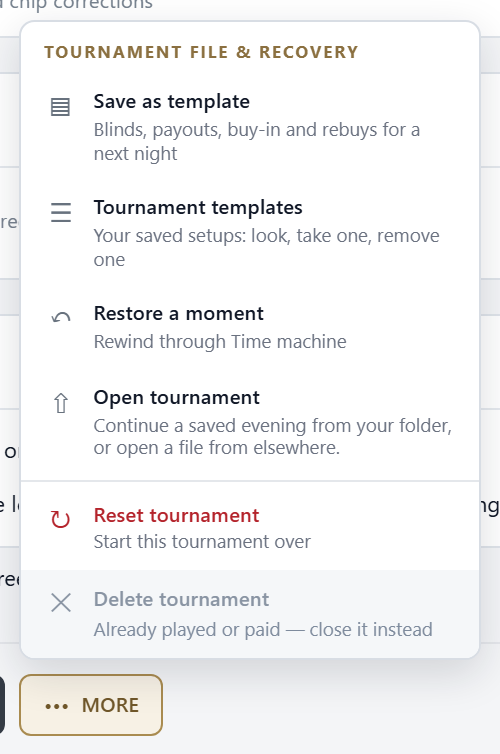
- Save as template: keeps these settings, blinds and prizes as a tournament template for another night (not the planned start, not a manual prize list).
- Tournament templates: your saved templates. Before the start you can load one; afterwards only look or delete.
- Restore a moment: every moment of tonight, newest first. Pick one and REWIND: everything after it is cut. FeltTD first writes a rescue copy of the whole night. Only on the tournament PC.
- Open tournament: the saved tournaments on this PC. A finished one opens read-only as results.
- Reset tournament: back to before the start, level 1. Choose KEEP BUY-INS & SEATS, KEEP REGISTRATIONS ONLY or RESET EVERYTHING. This cannot be undone.
- Delete tournament: only before the start, with nothing paid. A played or paid tournament is closed instead, never deleted.
Below the settings: Notes for the night (house rules, deals, reminders) and the Floor phone into this tournament QR code, for a phone that should open this tournament directly.
While it runs
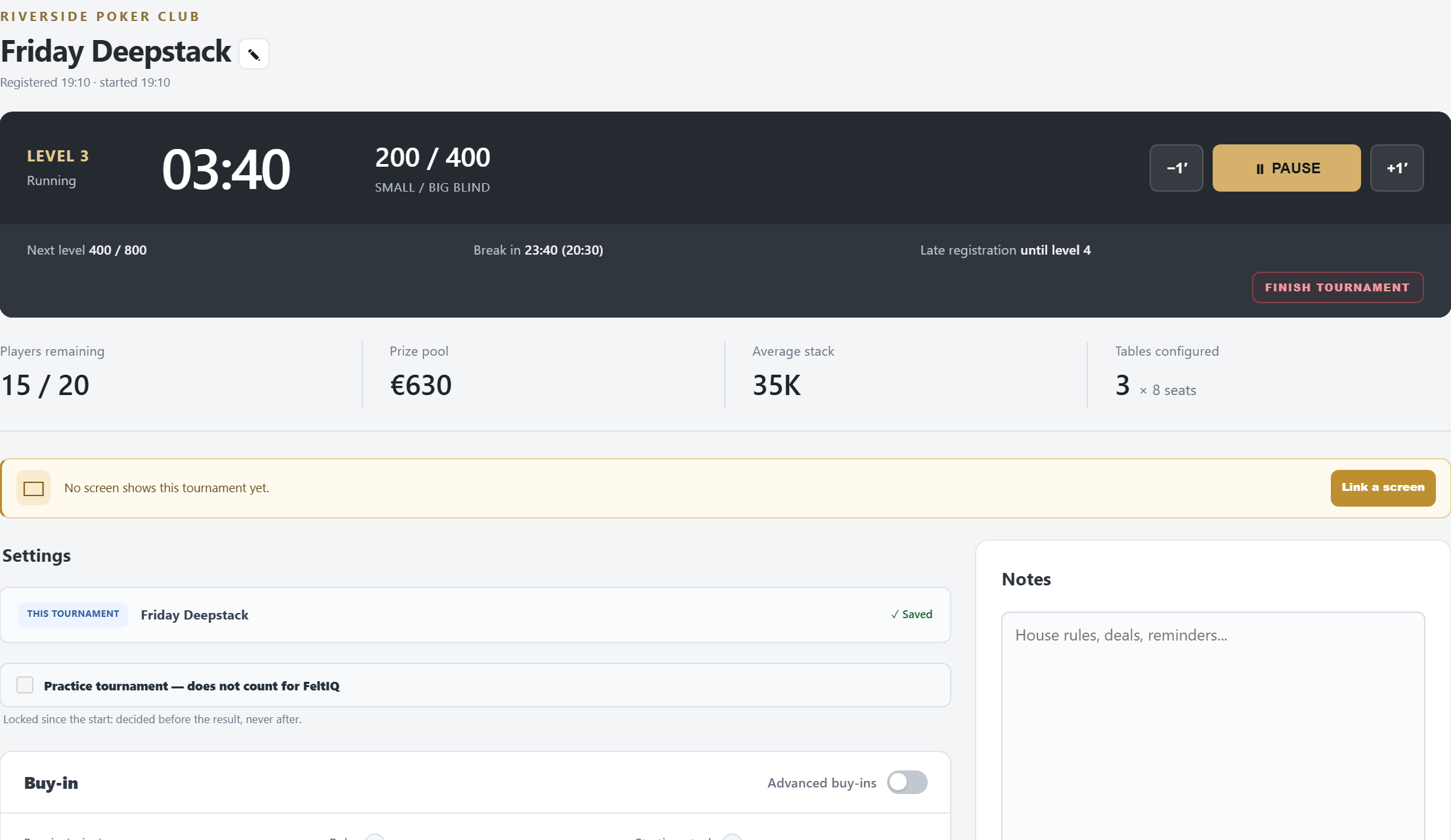
- The clock: level or break, the time (amber in the last minute), the blinds and ante, with −1′, ⏸ PAUSE / ▶ RESUME and +1′. Below: the next level, the next break and when late registration closes.
- The figures: Players remaining (still in / entries), Prize pool, Average stack, Tables configured.
- On screen: which screens show this tournament. Link a screen puts it on another screen.
- FINISH TOURNAMENT ends the tournament by hand. Normally you never need it: it finishes by itself when one player is left.
The top bar
The bar above every tab, for the tournament you are working on.

- 1 Current tournament: which tournament this window works on.
- 2 The clock: level, time left, blinds.
- 3 Clock buttons: previous level, one minute less, start/pause, one minute more, next level. Before the start, ▶ starts the tournament.
- 4 Players left / entries, and how many to the money (ITM once you are there). Click it for the Players tab.
- 5 The last action (“Max Porter busted”) and ↩ to undo it. With several, Jump back offers up to three; picking an older one undoes everything after it too. If another device acted in between, FeltTD refuses rather than undo someone else's work.
- 6 What the TV shows: CLOCK, LOBBY (before the start), SEATS, BLINDS, RANK (with a ranking), CHIPS (once a table was counted), PRIZES, PODIUM (three or fewer left). Click the lit one again to go back to the clock.
- 7 Announce: a free line on the TV (“Dinner is served”) for 1 or 5 minutes or until cleared; right-click clears it. Here also appear ✋ H4H on the bubble (see hand-for-hand) and BREAK / MOVES after a table break or balancing, to show the new seats on the TV again for two minutes.
- 8 Status lights: connected screens, floor phones, the backup and the internet. Click one for details.
- 9 ?: this help, for the tab you are on. Also F1.
When it is over
With one player left the tournament finishes by itself and the TV shows the winner. Every other tab then shows a banner with the winner and RESULTS & CLOSE.
- The results table: place, player and prize.
- Next, if you like: View summary (money, chips and results), Print payouts, Replay this night and Ranking.
- Correct this night: reopens the finished night for corrections, for an error found later: a wrong name, a buy-in, a payout. A wrong bust: while correcting, Restore a moment on this page takes the night back to just before it (the clock stands still, with the time it had then); play the end again and it finishes as before. On the tournament PC.
- Copy as a new tournament: Structure only, or Structure and players.
- CLOSE TOURNAMENT: takes it out of the switcher. The night stays saved and can be opened again.
Keys and rights
| Key | Does |
|---|---|
| F1 | Help for the tab you are on |
| F2 | Quick register (Players) |
| F3 | Unbust: the wrong player was busted |
| F4 | Clear the slide on the TV (moves, a deal, a mystery bounty) |
| F6 | Pause or resume the clock (it does not start a tournament) |
| F7 / F8 | One minute less / more |
| Ctrl+← / → | Previous / next level |
| Esc | Close a window |
F6, F7, F8 and Ctrl+arrows do nothing while you type in a field or a window is open. A club hotkey on the same key (Preferences › Automation) wins.
Rights. A floor phone or tablet runs the clock, the TV views, announcements and undo. Tournament settings, renaming, finishing, resetting and templates also need the tournament code, which FeltTD asks for by itself. Restore a moment and Close Tournament Director work only on the tournament PC.