Blinds
The blind structure: levels, antes, breaks and the chip-up. You edit a working copy; tonight's clock only changes when you press APPLY TO TOURNAMENT.
The structure editor
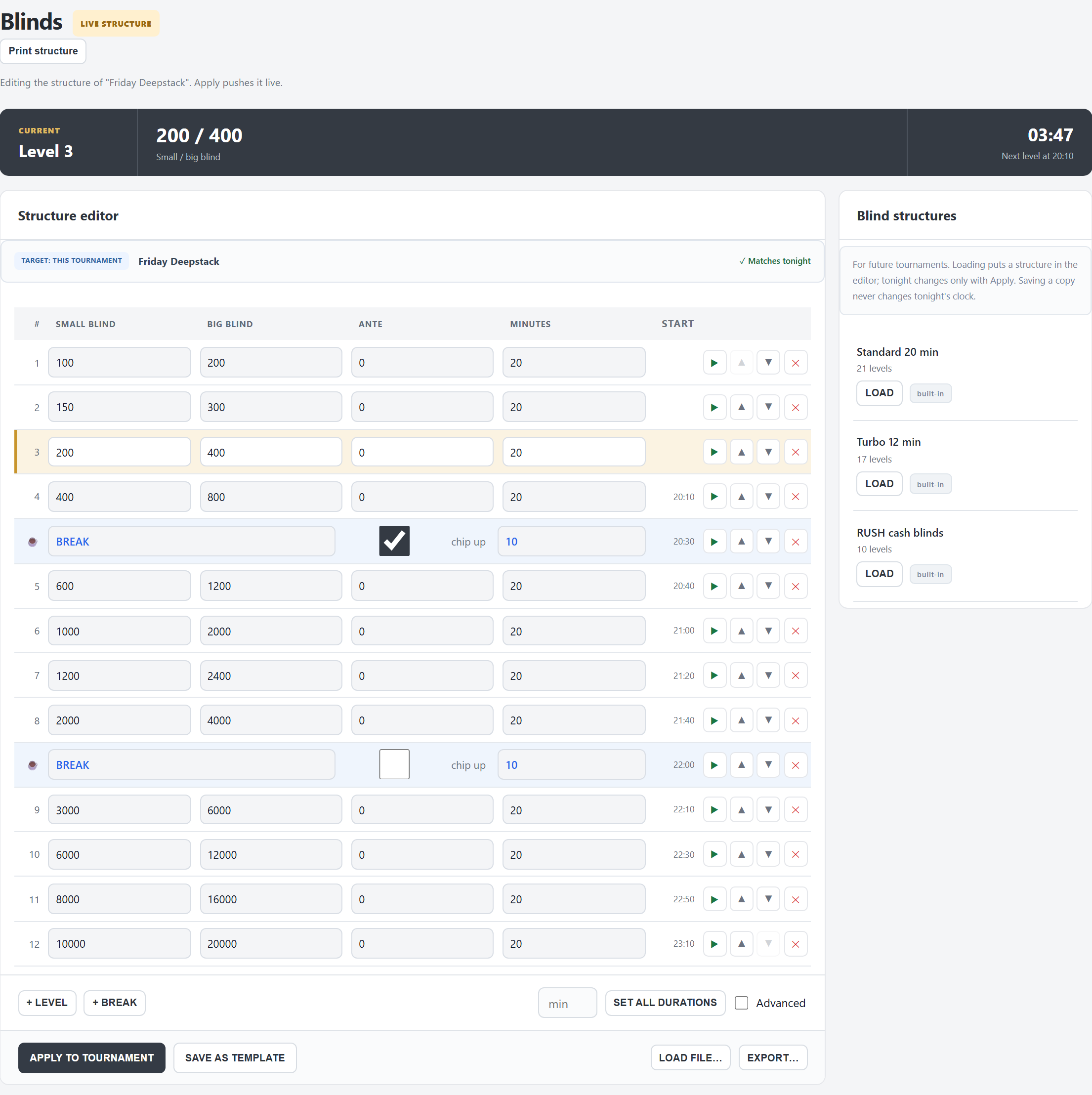
- On top, while a tournament is open: the CURRENT level, its blinds, the time left and when the next level starts.
- The bar above the levels says what you are editing and whether it matches tonight: ✓ Matches tonight, or amber Changed — not applied yet with Back to tonight's structure to throw your changes away.
- The columns: Small blind, Big blind, Ante, Minutes, and once the tournament runs, the clock time each level Starts. Breaks have no number, so the numbers match the levels on the clock.
- Print structure prints tonight's structure (as applied), the current level marked.
With no tournament open, the tab is a workshop for your saved structures: it opens with the first template and has no APPLY button.
Levels and breaks
- + LEVEL adds a level at the end, at double the last blinds. + BREAK adds a 15-minute break at the end. Move a row into place with ▲ ▼; ✕ removes it.
- Ante: an ante equal to the big blind is a big blind ante; the TV shows it as BB ANTE.
- chip up on a break: the clock shows the chip-up message before that break and during it. How many minutes before, and the text, are set in Preferences › Status messages (“Chip-up call”, 5 minutes by default).
- SET ALL DURATIONS: type the minutes and every level gets that length; breaks keep their own.
- Advanced: adds a Game column for mixed games (PLO, Limit Hold'em…). The TV announces the switch; empty means the same game as before.
Apply to tonight
APPLY TO TOURNAMENT puts the whole structure on tonight's clock at once. A row with a small or big blind of 0 is left out, and FeltTD says so.
▶ on a row makes that row the current level and starts it at its full length. Before the start, it sets the level the tournament starts at.
While the clock runs
- New blinds or ante for the current level show at once.
- New minutes for the current level count from the next level change: the time left now is not touched. To change it now, use −1′ / +1′ in the top bar.
- Adding, removing or moving rows above the current level is fine: APPLY keeps the level that is playing, with its time. If you removed the level that is playing, FeltTD asks first.
- When the last level runs out, the clock pauses rather than going on.
Templates and files
- Blind structures (right): your saved structures. LOAD puts one in the editor; tonight changes only when you apply it. Structures marked built-in come with FeltTD (Standard 20 min, Turbo 12 min, RUSH cash blinds) and always stay; your own can be deleted.
- SAVE AS TEMPLATE: saves what is in the editor under a name, for later tournaments. The same name overwrites; the names of the built-in structures are taken.
- EXPORT… saves the structure as a .blinds.felt file, loadable on any FeltTD. LOAD FILE… reads one, or a structure from your old tournament software (.trt) or JSON, into the editor. Both work on the tournament PC.
- Tools › Library keeps your structures together with your prize models and tournament templates, to save as a file or take to another club.
Structure generator
No structure yet? Tools › Structure generator makes one from how long you want to play: the hours, the players you expect, the level length, the starting stack, the smallest chip, a break every few levels and from which level the ante starts. Choose the pace (Balanced, Hard start, Hard finish), GENERATE, then OPEN IN BLINDS EDITOR to fine-tune and apply it, or SAVE AS TEMPLATE.
A single tournament made in Events with an end time gets its structure the same way.
Good to know
- Changes you did not apply yet stay in the editor when you leave the tab, for that tournament, until you apply them or press Back to tonight's structure.
- Apply and ▶ are not undone with ↩. Change them back by hand.
- Late registration “through level n” follows the level number: if you insert levels, check it on the Tournament tab.
Rights. From a floor phone or tablet, applying, saving a template and ▶ need the tournament code; FeltTD asks for it.