Preferences
How the club works with FeltTD: its name and money, what the room sees and hears, which devices may join, and where everything is kept. Set once; every tournament follows.
Finding a setting
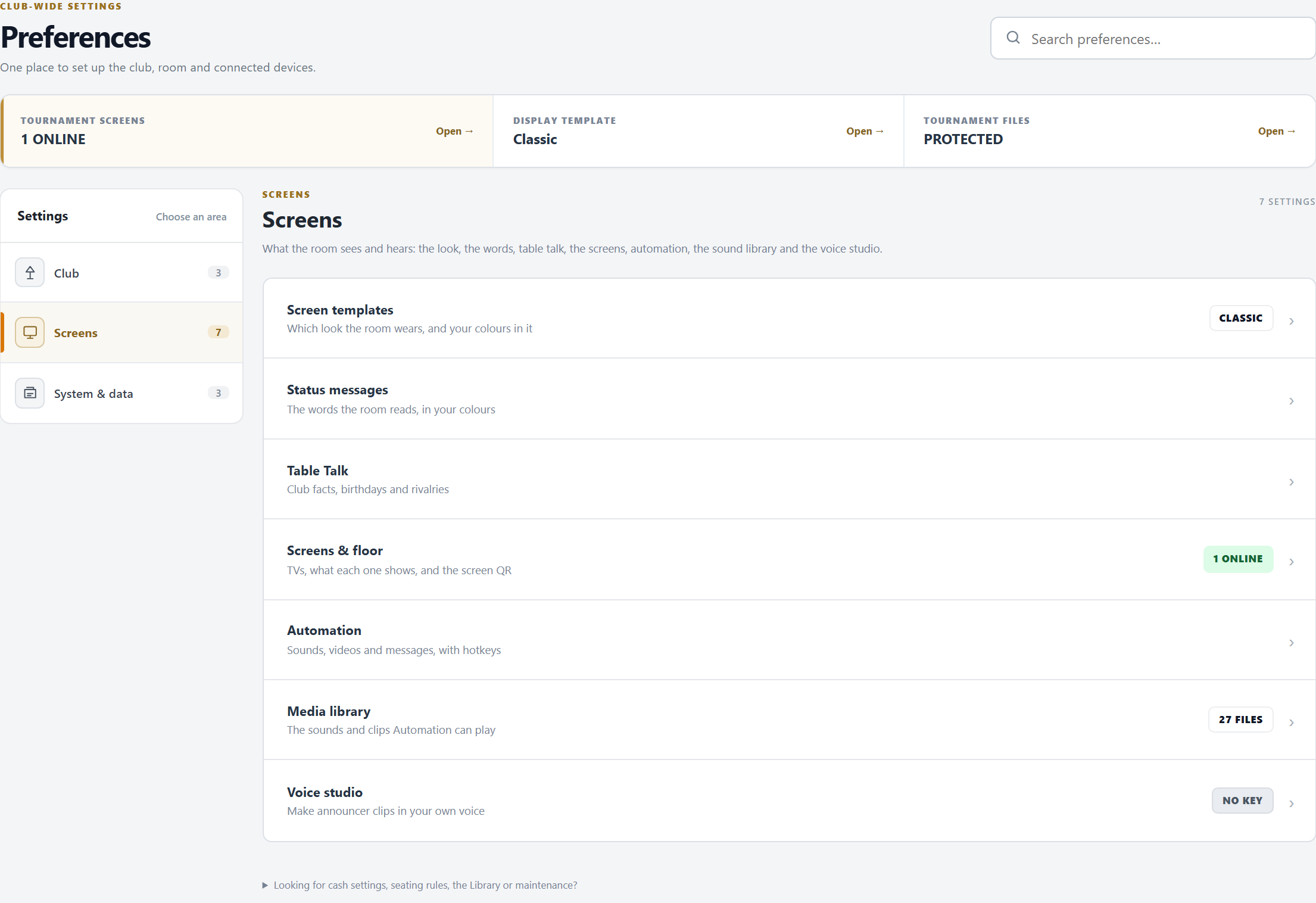
- The shortcuts on top: Tournament screens, the Display template, and Tournament files (or Devices needing attention while a device waits for approval).
- The areas: Club, Screens and System & data. Each setting opens in its own page with the others of its area beside it; ← Club (or the area's name) goes back.
- Search knows the words a TD types (“nickname”, “birthday”, “backup”). Settings that live on another tab (the Library, Move & restore, the cash room, FeltIQ) are found too, with the tab they are on. Looking for cash settings, seating rules, the Library or maintenance? lists them.
- No second copy of the club's data yet? Still to set up says so, with Set up backup →.
Club
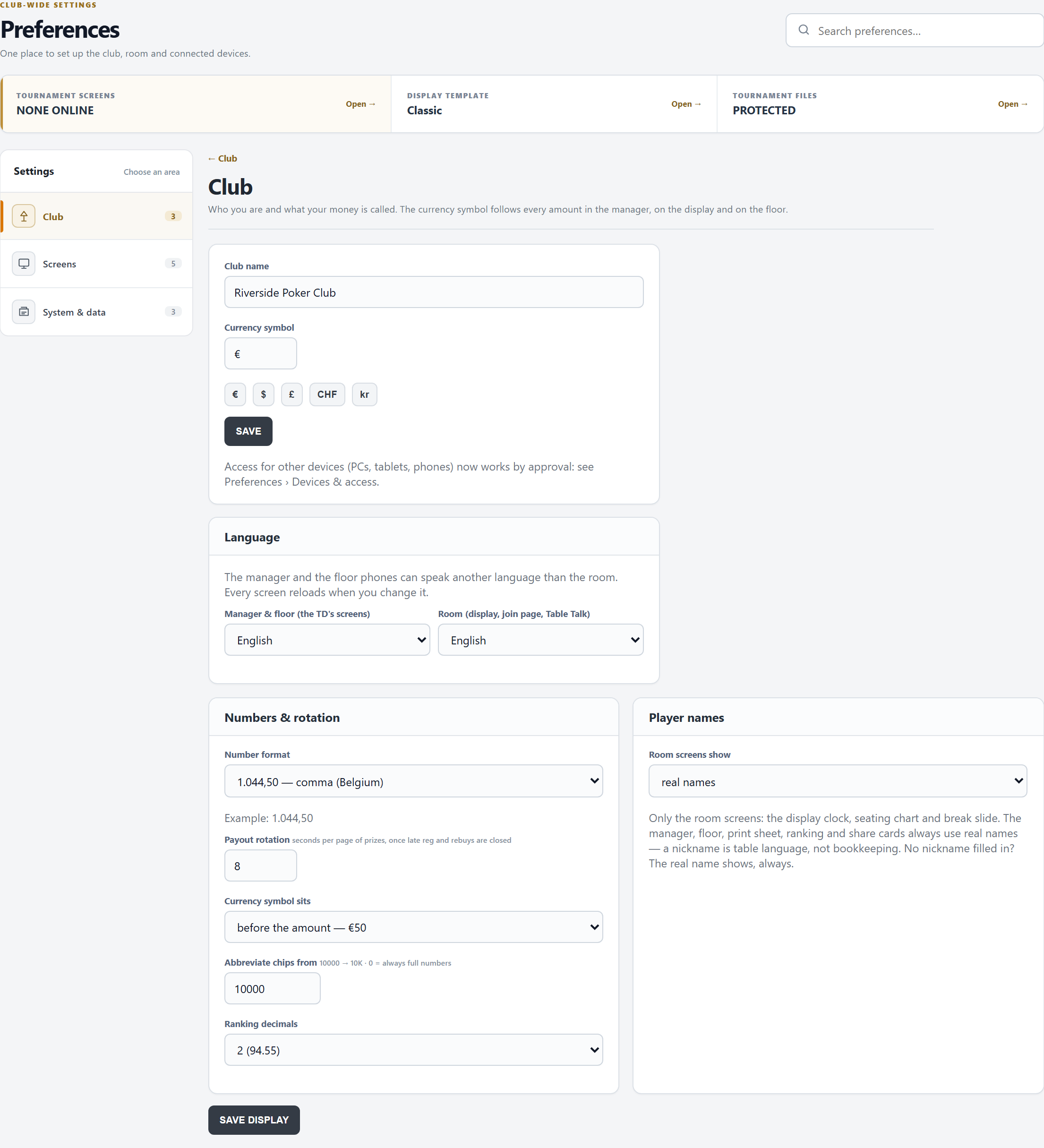
- Club name and Currency symbol (1 to 4 characters; € $ £ CHF kr in one click), then SAVE. The name heads the TV, the floor phone, the prints and the club page.
- Language: one for the Manager & floor (the TD's screens), one for the Room (the TV, the join page, Table Talk). A change applies at once: every screen reloads, this one too, so save the other cards first.
- Numbers & rotation:
- Number format: 1,044.50 or 1.044,50.
- Payout rotation: seconds per page of prizes on the TV, once late registration and rebuys are closed (3 to 60, 8 by default).
- Currency symbol sits before (€50) or after (50 kr) the amount.
- Abbreviate chips from: 10000 shows 10K; 0 always shows the full number.
- Ranking decimals: 0, 1 or 2 for the points in the ranking.
- Player names: the room screens show the real name, or the nickname when set (the clock, the seating, the break slides, Table Talk). The manager, the floor phone, prints and the ranking always use the real name. Nicknames are filled in on the Database.
- These two cards save with SAVE DISPLAY; the screens follow at once.
Club page & website widget
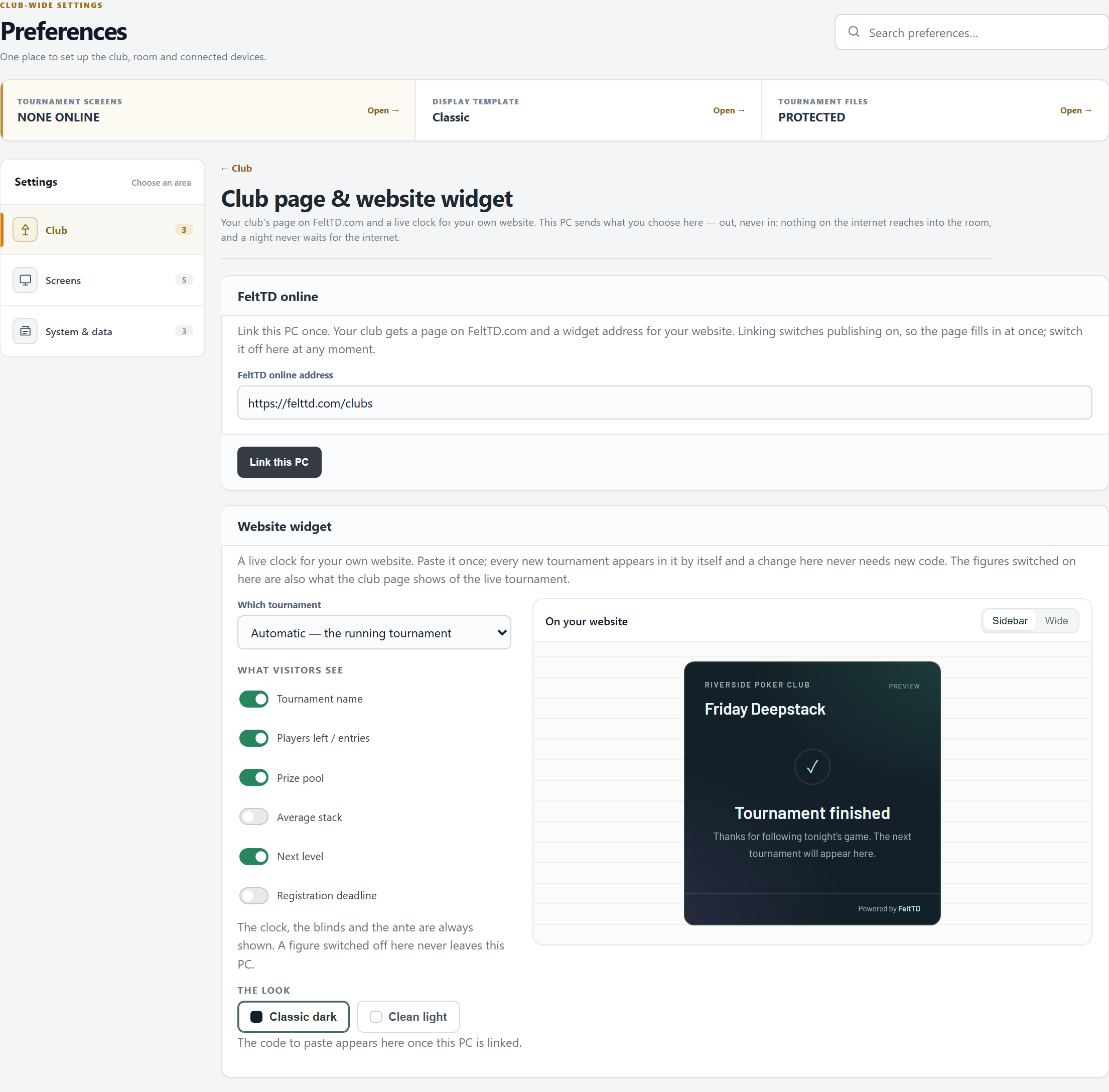
- Link this PC once (with internet). The club gets a page on FeltTD.com and a widget address, and publishing is switched on: the page fills in at once. The Publish switch turns it off and on; switched off, what was published is taken down at once (without internet: as soon as it is back) and the page and the widget say so.
- Website widget: which tournament it follows (Automatic: the one that is running), which figures visitors see (the clock and the blinds always), and the look (Classic dark or Clean light). The preview beside it is drawn exactly as the website will. Copy code gives what to paste once into your website: the widget, and under it a small line “Live tournament clock by FeltTD” with a link to FeltTD, which you may leave out.
- Your club: address, phone, email, website and a few words. An empty field is not shown.
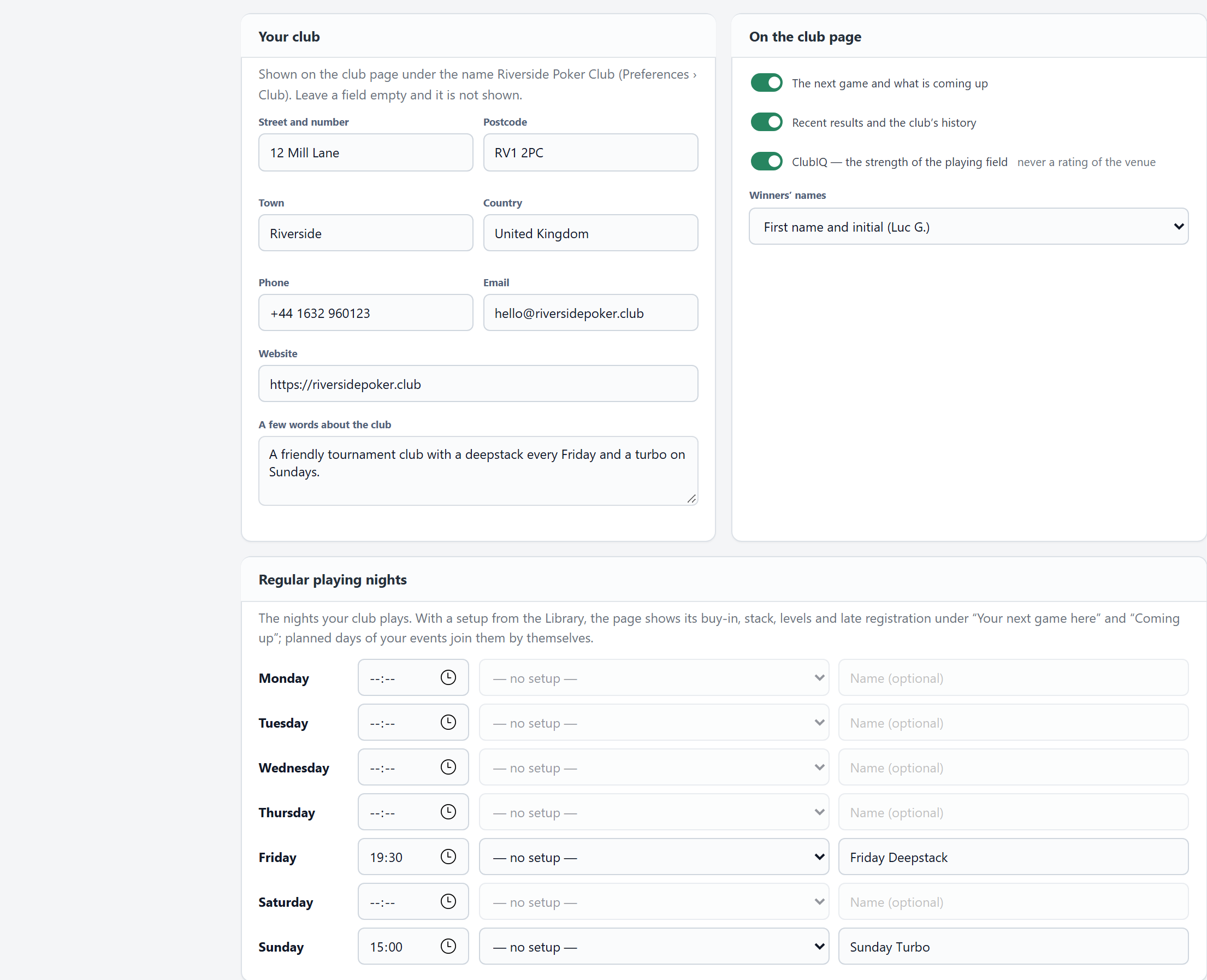
The club's details and its regular nights, as the club page shows them. - On the club page: the next game and what is coming up, recent results and history, ClubIQ (the strength of the playing field, never a rating of the venue), and winners' names as Luc G. or no names.
- Regular playing nights: a start time per weekday, a tournament setup from the Library (its buy-in, stack, levels and late registration go on the page) and a name.
Every change is saved as it is made, and goes out within seconds (every 10 seconds while a tournament runs, else every minute). Only what the page shows leaves this PC: no full names, player lists, stacks or payments. Unlink this PC deletes the club's page; linking again gives new addresses. A new club page shows straight away by its address; the public list of poker rooms on FeltTD.com shows it once FeltTD has checked it.
Special formats
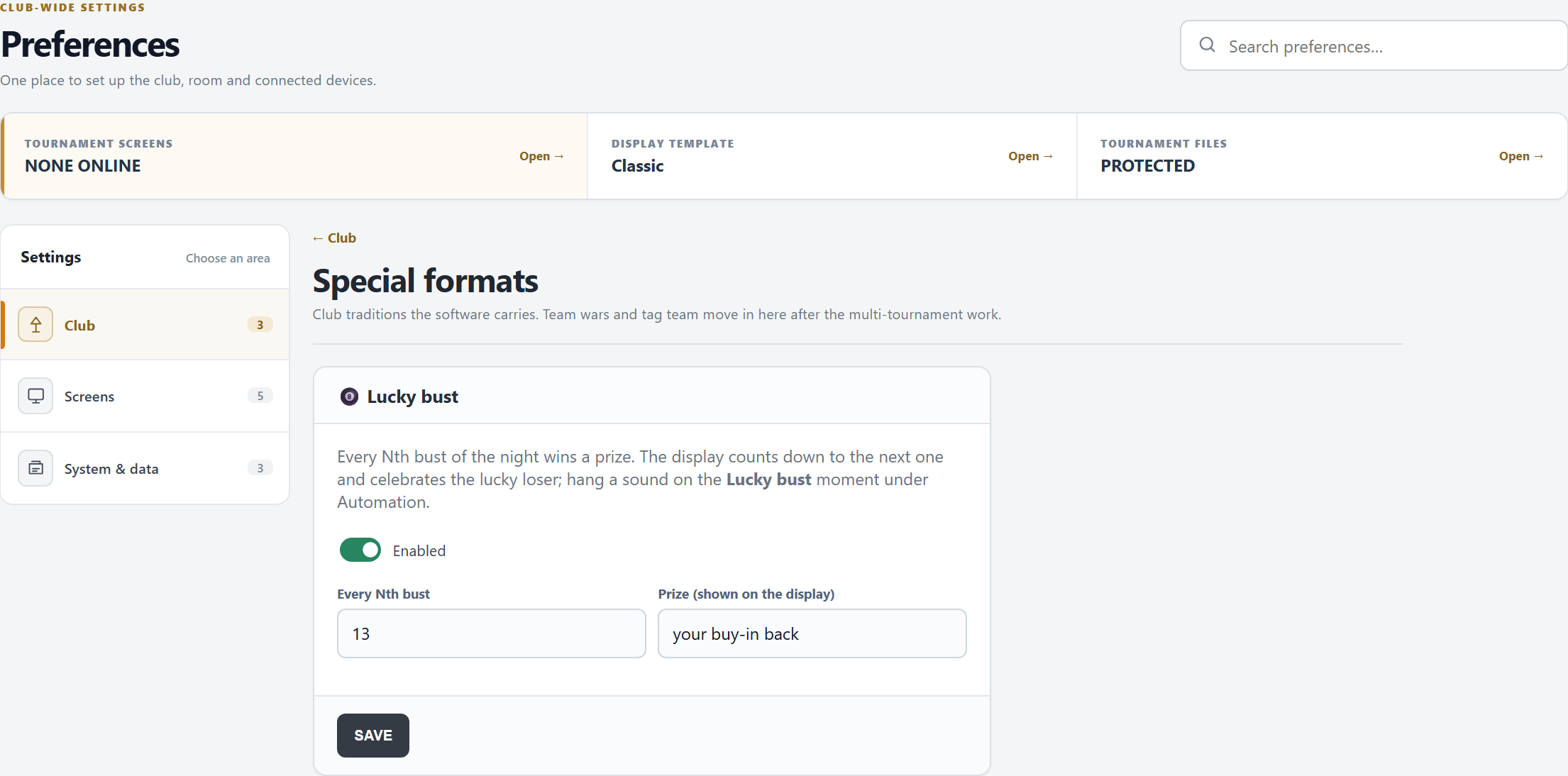
- Lucky bust: every Nth bust of the night (2 to 99) wins a prize. The TV counts down to it and celebrates the lucky one by name with the prize, for 12 seconds. SAVE applies it.
- A sound for the moment: an Automation rule on Lucky bust.
- The winner's bust does not count. A bust taken back (an unbust, or a re-entry) leaves the count, and counts again when it happens again.
Screen templates
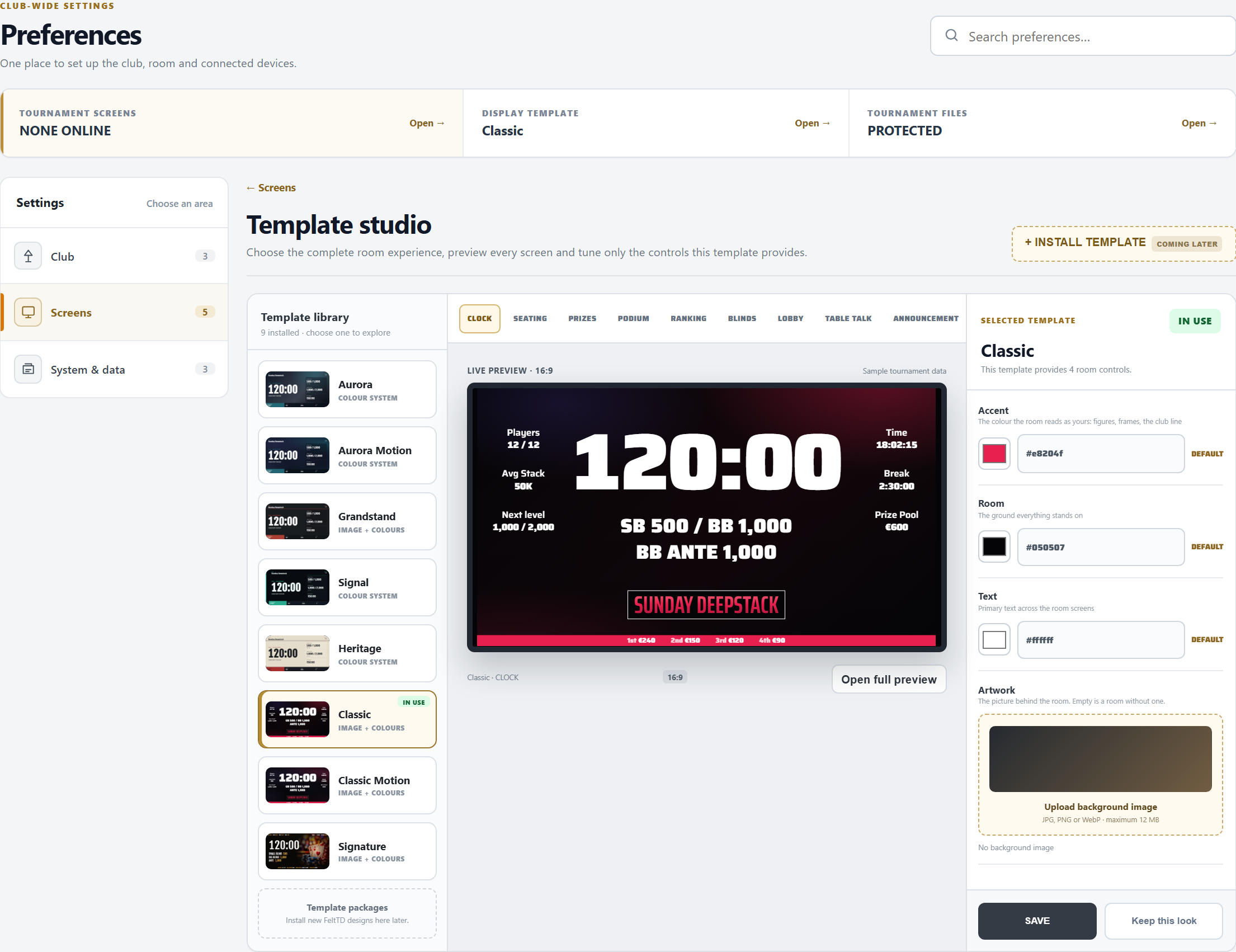
- Template library: nine looks (Aurora, Grandstand, Signal, Heritage, Classic, Signature, and Motion versions with a slow glow). IN USE marks the one on the screens. Clicking a card only previews it.
- The live preview is the real TV with sample data: CLOCK, SEATING, PRIZES, PODIUM, RANKING, BLINDS, LOBBY, TABLE TALK, ANNOUNCEMENT, CASH STRIP and BUST + QR. Open full preview shows it full size.
- The template's own controls: Accent, Room, Text, Panels (and the two glow colours of a Motion look), each with DEFAULT. Text that is hard to read on the room colour gets a warning. Some looks take a background image (JPG, PNG or WebP, up to 12 MB).
- USE THIS TEMPLATE (or SAVE for the look in use) puts it on every screen. Keep this look stores it, colours and picture included, in the Library as a screen look.
A look from FeltTD Studio arrives as a file through the Library; while it is on the screens, the page says so, and choosing a template puts a template back.
Status messages
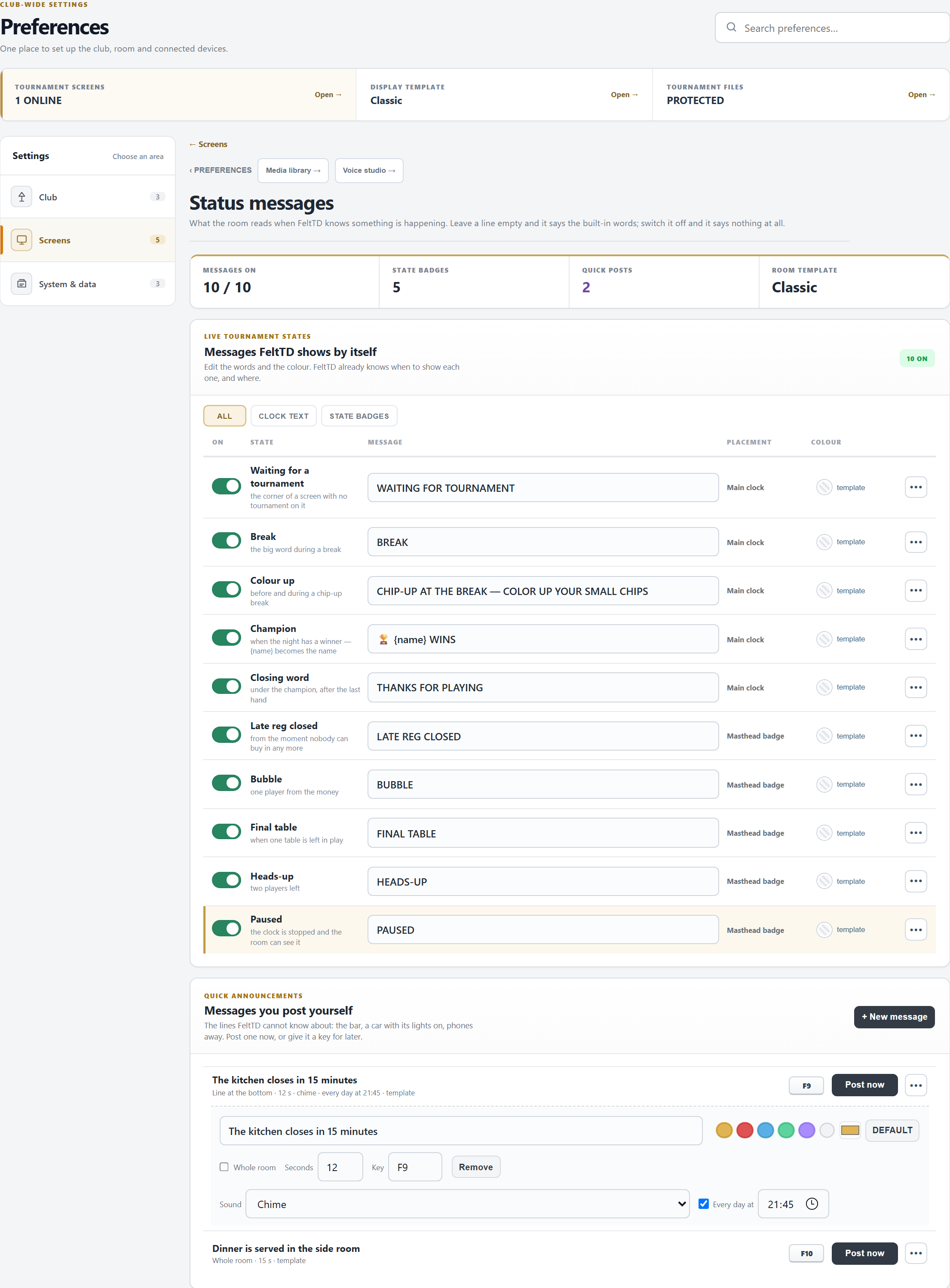
- Live tournament states: the ten moments FeltTD knows by itself.
- In the clock: Waiting for a tournament (the corner of a screen with no tournament), Break, Colour up, Champion (
{name}becomes the winner) and the Closing word. - As a badge: Late reg closed, Bubble, Final table, Heads-up, Paused. One shows at a time, the most urgent first.
- In the clock: Waiting for a tournament (the corner of a screen with no tournament), Break, Colour up, Champion (
- Quick announcements: messages you post yourself, such as “The kitchen closes in 15 minutes”. Each has its words, a colour, Whole room (the full screen) or a line at the bottom, how many seconds, and a key. Post now shows it straight away.
- Sound: none, the Chime (new messages have it), or one or more clips from the Media library (one plays each time). Make the spoken version in the Voice studio.
- Every day at: the message comes on its own at that hour, with its sound, once a day. Untick it for a night without.
- Chip-up warning: how many minutes before the break the colour-up call appears. It only comes before a break that has the chip-up tick in the Blinds.
- Nothing is kept until SAVE DISPLAY.
Table Talk
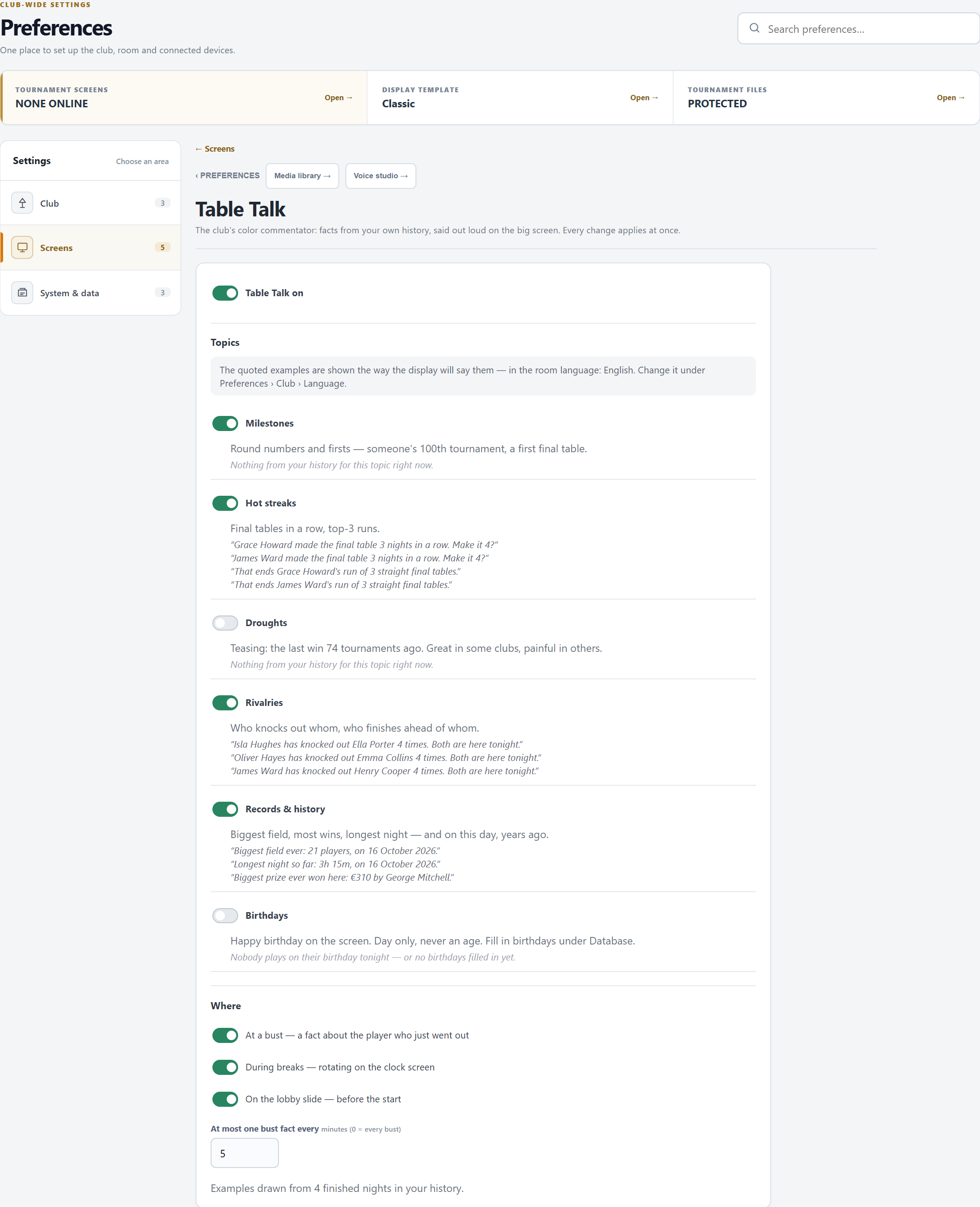
- Table Talk on, then the topics: Milestones (a 50th night, a 10th win, a first final table), Hot streaks, Droughts, Rivalries (who keeps knocking out whom: counted when busts are booked with who busted them), Records & history and Birthdays. Droughts and birthdays are off until you switch them on.
- The examples are real facts from your history in the room language, with stand-in names.
- Where: At a bust (a fact about the player who just went out, a few seconds after the bust), During breaks and On the lobby slide before the start (a new fact every 12 seconds).
- At most one bust fact every … minutes (0 = at every bust).
- Birthdays come from the Database and are only said on the day itself, during breaks or in the lobby, never with an age.
- Every change applies at once.
Screens & floor
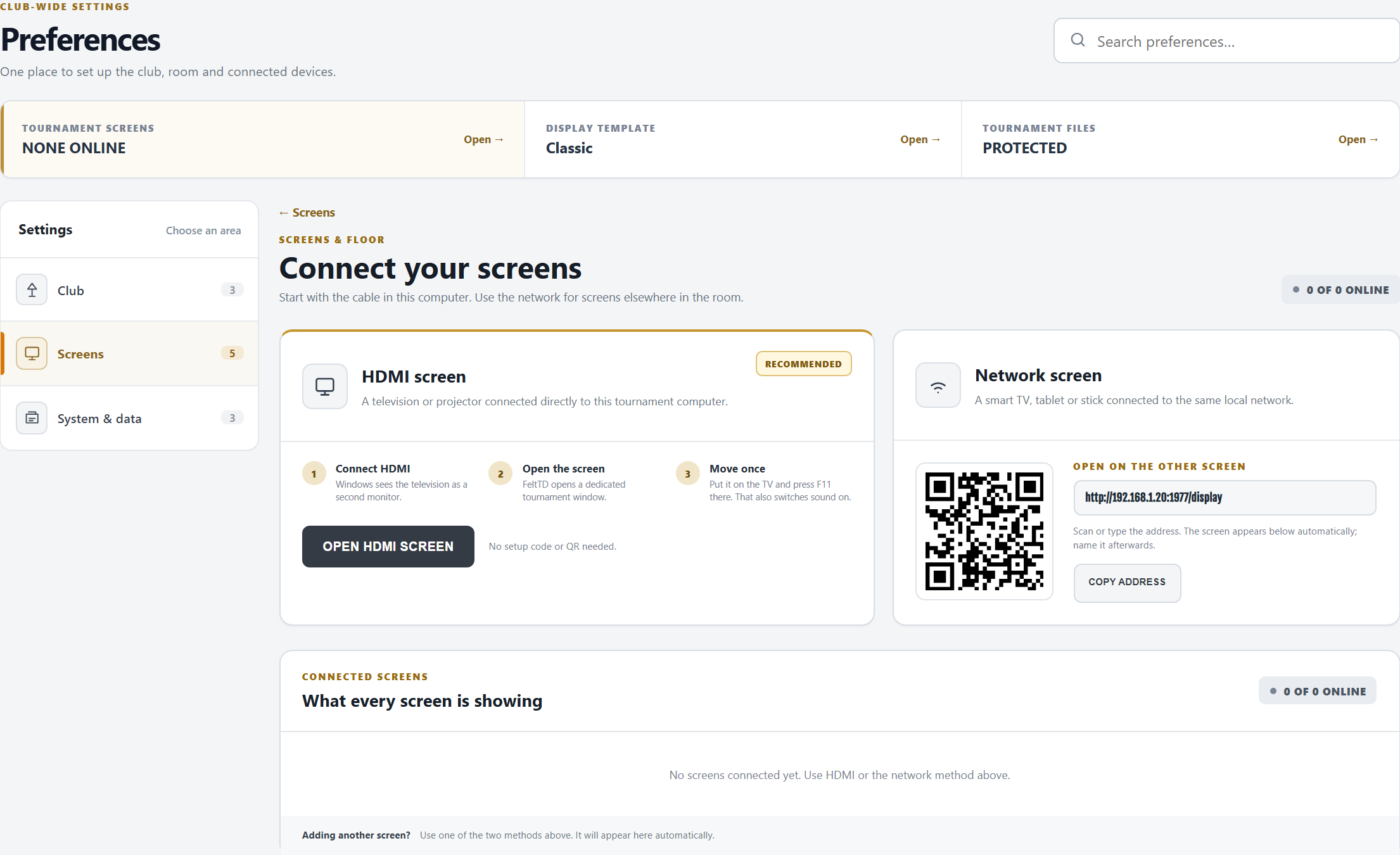
- HDMI screen (the TV on a cable in this PC): OPEN HDMI SCREEN, move the window to the TV and press F11 there. That also switches the sound on.
- Network screen (a smart TV, a tablet, a stick): scan the QR or type the address on it. It appears in the list below by itself.
- Connected screens: each with its name, online or last seen, and the tournament it shows. Automatic shows the one open tournament (or the cash room); with two tournaments open, choose per screen. Identify shows the screen's name on it for five seconds; ••• renames or removes it.
- The floor phone's QR is on Devices & access, and on the Tournament tab for the TV.
Automation
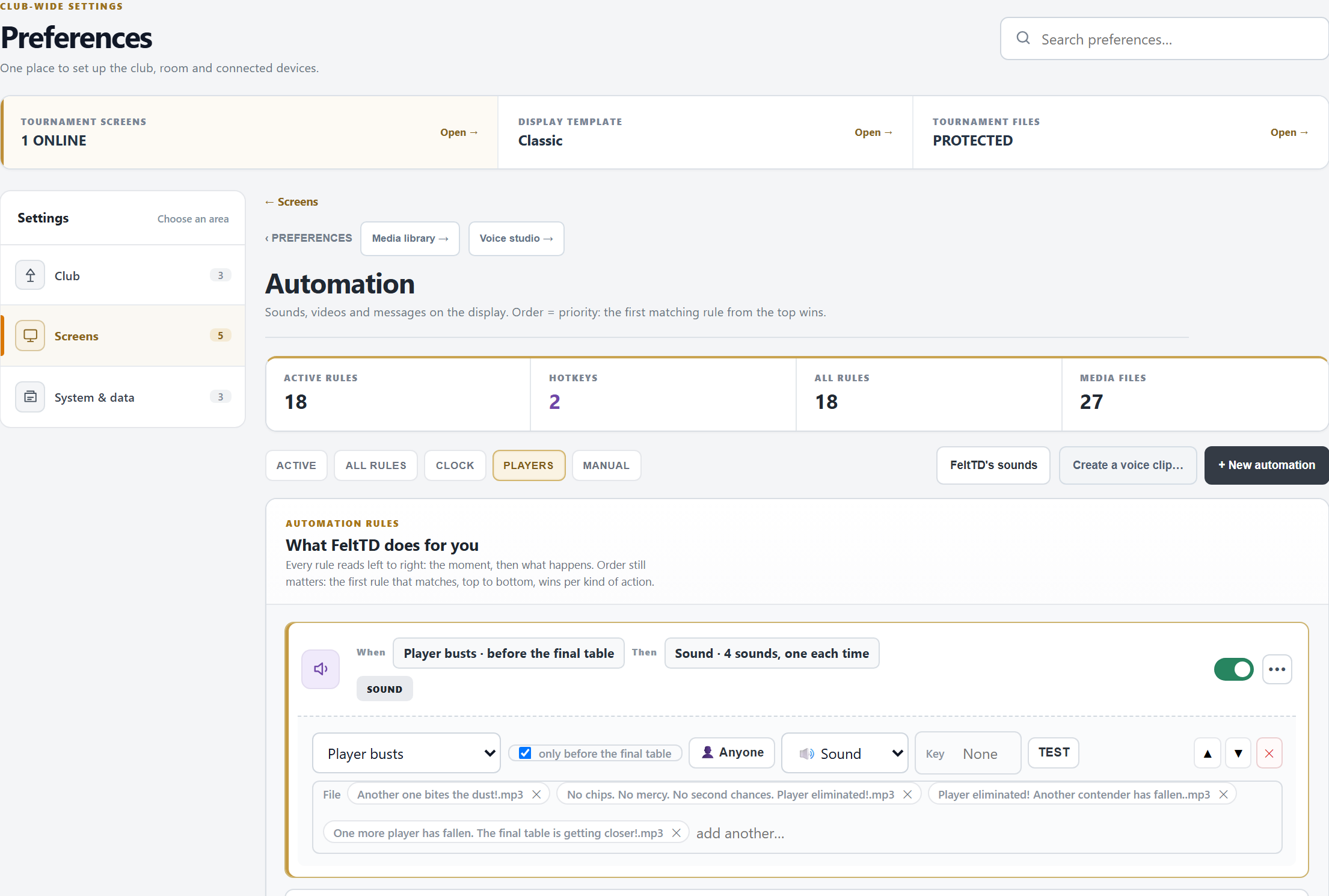
- A rule is When a moment, Then a Sound, a Video (full screen) or a Message on the TV. + New automation adds one; ••• opens it.
- The moments: so many minutes before the planned start, tournament starts, blinds up (any level or one), a number of minutes before blinds up or before the break ends, break starts and ends, the chip-up moment, the last level of late registration (if you like only when re-entry ends at that level too), late reg closes, re-entry closes, a table breaks, Lucky bust, the game changes, the clock paused, a player busts (anyone or one player; only before the final table; only once re-entry is closed), near the bubble (so many players from the money), bubble, in the money, final table, three left, heads-up, winner, and Manual (a key only).
- Files come from the Media library. Give a rule several: one plays each time, never the same twice in a row.
{level}in a name becomes the level number (level-{level}.mp3); a name ending in*picks one of the matching files. - One voice at a time: sounds never talk over each other. Moments of the same instant play one after the other (blinds up, then registration closed). What happens to players speaks once: a bust that reaches the final table, the money or three left plays only that bigger moment, and a rule for one player beats the rule for anyone. The built-in chime and gong step aside for a sound rule on the same moment.
- FeltTD's sounds: FeltTD comes with an announcer for all these moments (“Shuffle up and deal!”, “Another one bites the dust!”, “Congratulations! All remaining players are officially in the money!”…). A new club starts with them; the button adds them to rules you already have, never over them. Change or switch off any of them like your own.
- Key: press a key or a combination; it then fires that rule from anywhere in the manager (not while typing). F1 to F4 are FeltTD's own and cannot be used. Hotkeys lists them; a key on two rules only fires the first.
- TEST plays the rule on the screens now, saved or not. The order is the priority: for one moment, the first sound, the first video and the first message from the top play.
- Nothing is kept until SAVE EVENTS; a page left without it forgets the changes.
Media library
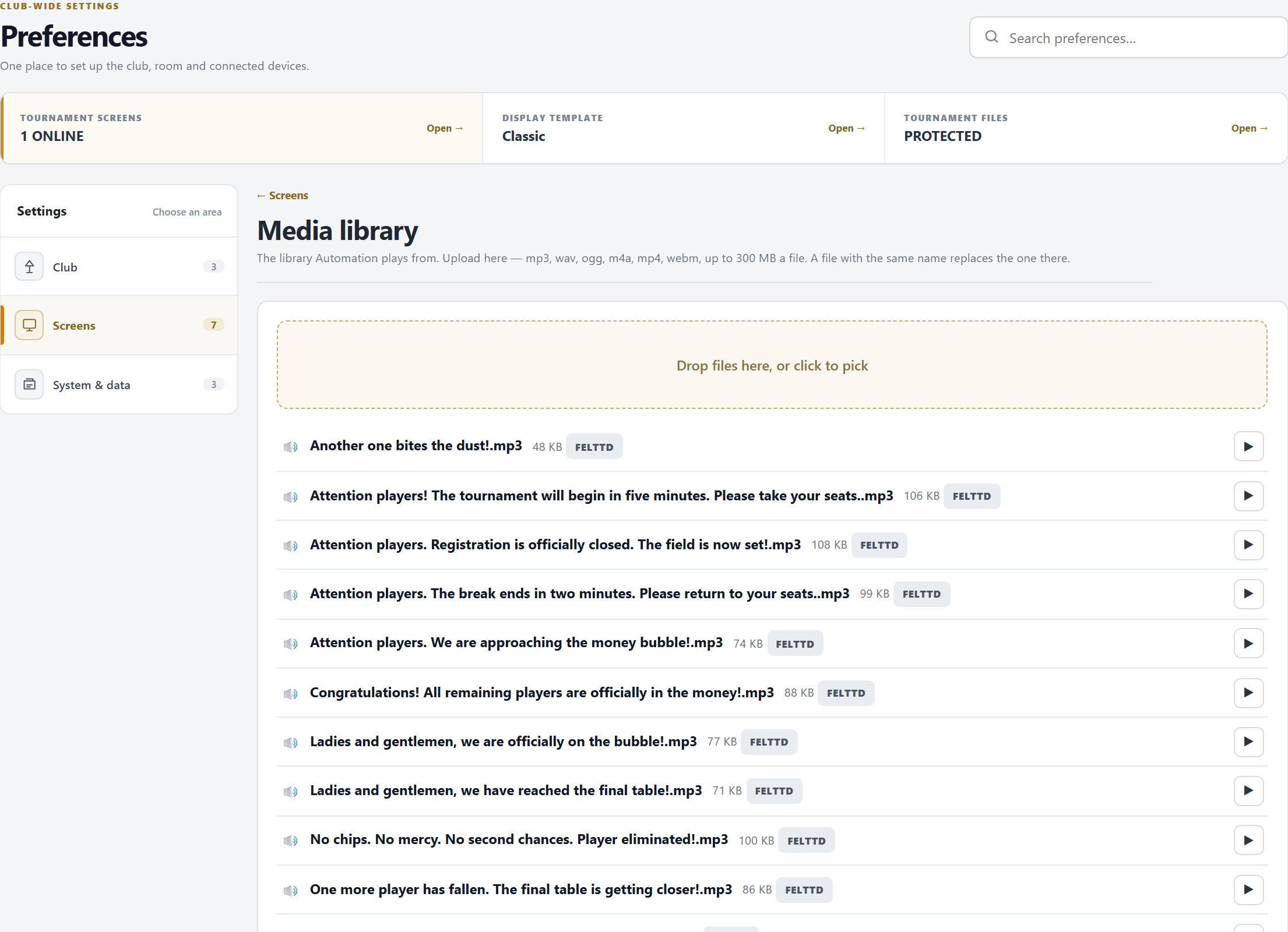
- Drop files (or click to pick): mp3, wav, ogg, m4a, mp4 or webm, up to 300 MB each. A file with the same name replaces the one there. Uploading works on the tournament PC.
- ▶ plays one; DELETE removes it for good. A rule that points to it stays silent.
- Sounds marked FeltTD come with the program: they always stay and come back with every update.
- The library is not in the backup: copy the media folder by hand when you move (see Move & restore).
Voice studio
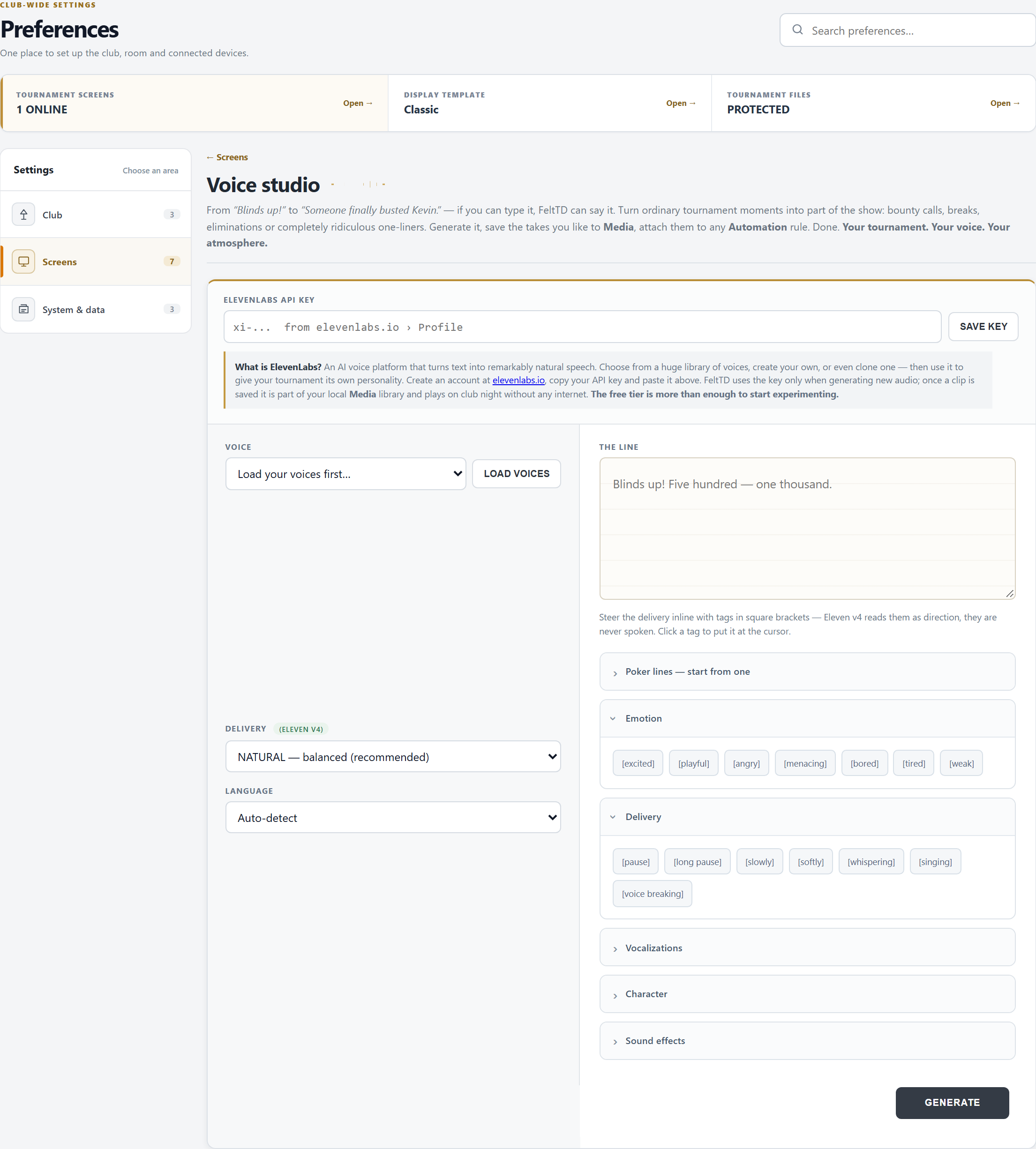
- Your own ElevenLabs API key (from elevenlabs.io › Profile), then SAVE KEY. It stays on the tournament PC; an empty field keeps the saved key; Remove key takes it away.
- LOAD VOICES and pick one; the Delivery (Announcer, Natural, Steady) and the Language.
- Write the line (up to 500 characters), or start from one of the poker lines. Tags in brackets, such as
[excited], steer how it is said. - GENERATE, listen, and SAVE TO MEDIA: the clip is evened out to a steady loudness and kept as a WAV in the Media library. Use for an announcement drafts an Automation rule with it; check it and press SAVE EVENTS.
Making a clip needs internet; playing it never does.
Devices & access
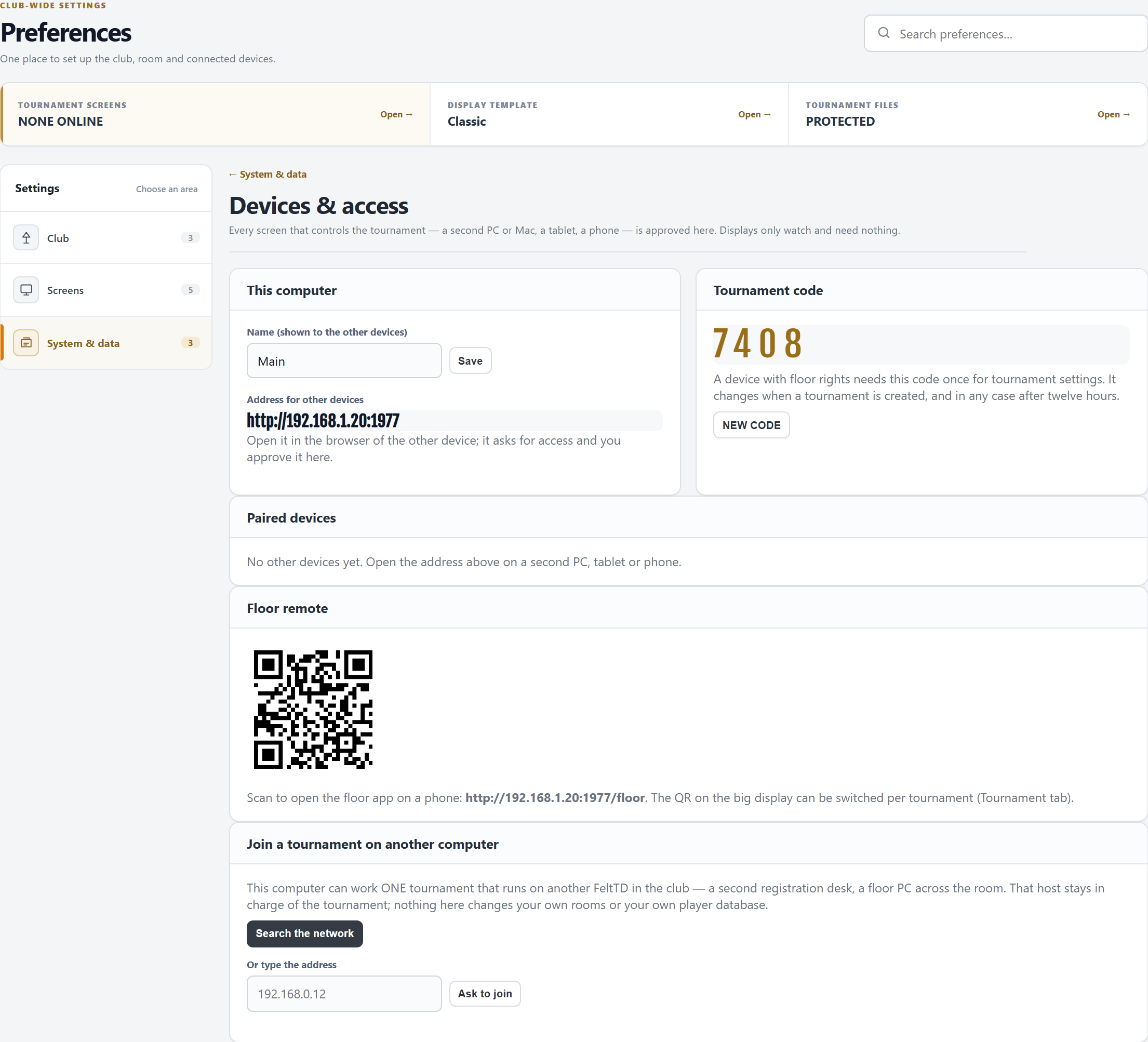
- This computer: the name other devices see, and the address to open on them.
- A second PC, a tablet or a phone opens that address and asks for access. The request pops up on the tournament PC (and waits under Waiting for approval): ALLOW AS FLOOR, ALLOW AS FULL TD or REFUSE. Screens that only show never need approval.
- Floor: players, tables, the clock, announcements, undo and the cash desk. Tournament settings ask once for the Tournament code. Full TD: everything except the settings that are the tournament PC's own (most of Preferences, files, restore).
- Tournament code: four digits, new with every new tournament and after twelve hours. NEW CODE locks every floor device that entered the old one.
- Paired devices: online or last seen, the rights (changed at once), Rename, Remove (it is thrown out and must ask again).
- Floor remote: the QR that opens the floor app on a phone.
- Join a tournament on another computer: this PC works ONE tournament that runs on another FeltTD in the club. Search the network or type its address, Ask to join, and that computer approves this one like any device. Then choose the tournament. A refused computer stays refused until you disconnect and ask again.
Tournament files
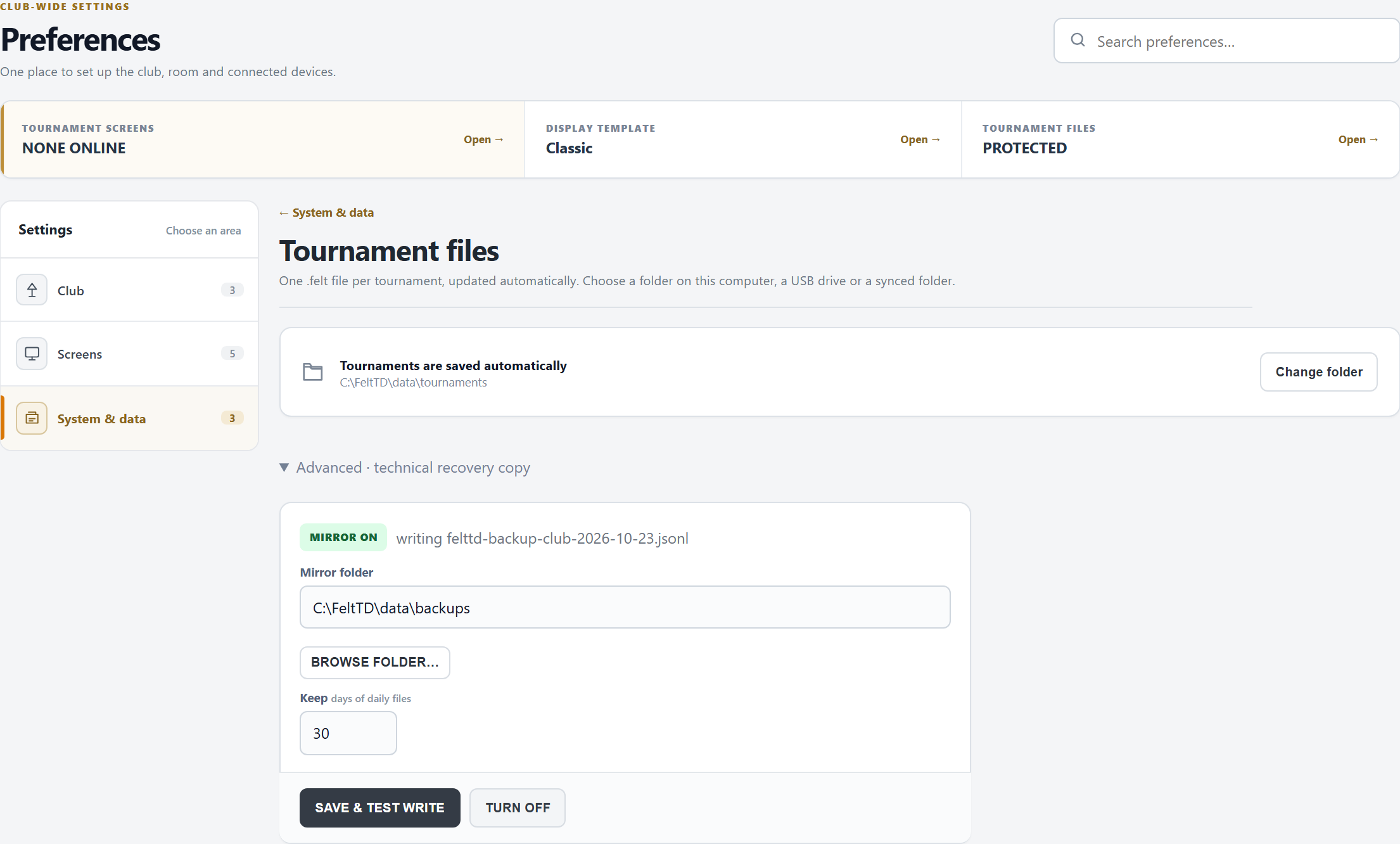
- Every tournament is saved by itself as a .felt file, a second after each change. Change folder picks another place (a USB stick or a synced folder works). Tournaments already finished stay in the old folder.
- Advanced · technical recovery copy: a live copy of everything (the club, every tournament, the settings) in a second place. Choose the Mirror folder (BROWSE FOLDER…), how many days of daily files to keep, and SAVE & TEST WRITE: it writes a first copy and checks it.
- The state says what you have: MIRROR ON, IN THE CLOUD (a Google Drive, OneDrive, Dropbox or iCloud folder, as long as that runs), SAME DISK (it would go down with this PC: pick another disk), or NO MIRROR.
- The backup pill in the top bar shows the same at a glance. Restoring from the copy: Tools › Move & restore.
Live data & integrations
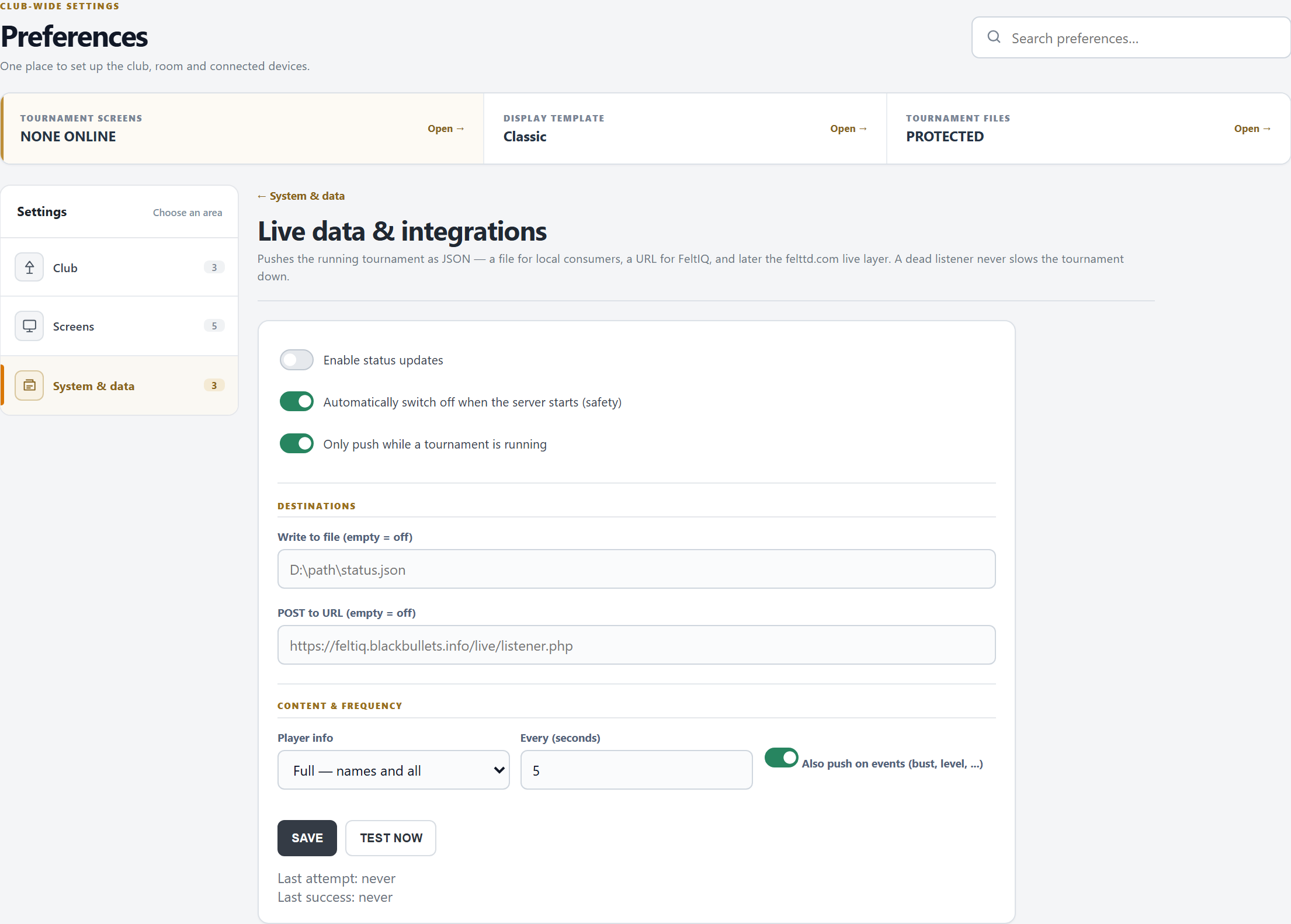
- FeltTD writes the running tournament as JSON to a file and/or posts it to a URL, every few seconds and after each change. A listener that does not answer never slows the night down. For the club page on FeltTD.com you need nothing here: see Club page & widget.
- Player info: Full (names), Anonymous (Player 1, 2, …) or Off (counts only). Players' email, phone and other details are never sent.
- Automatically switch off when the server starts is on by default: switch the feed on again each time FeltTD starts, or untick it.
- TEST NOW sends one update at once; the line below shows the last attempt and the last success.
Player & seating rules
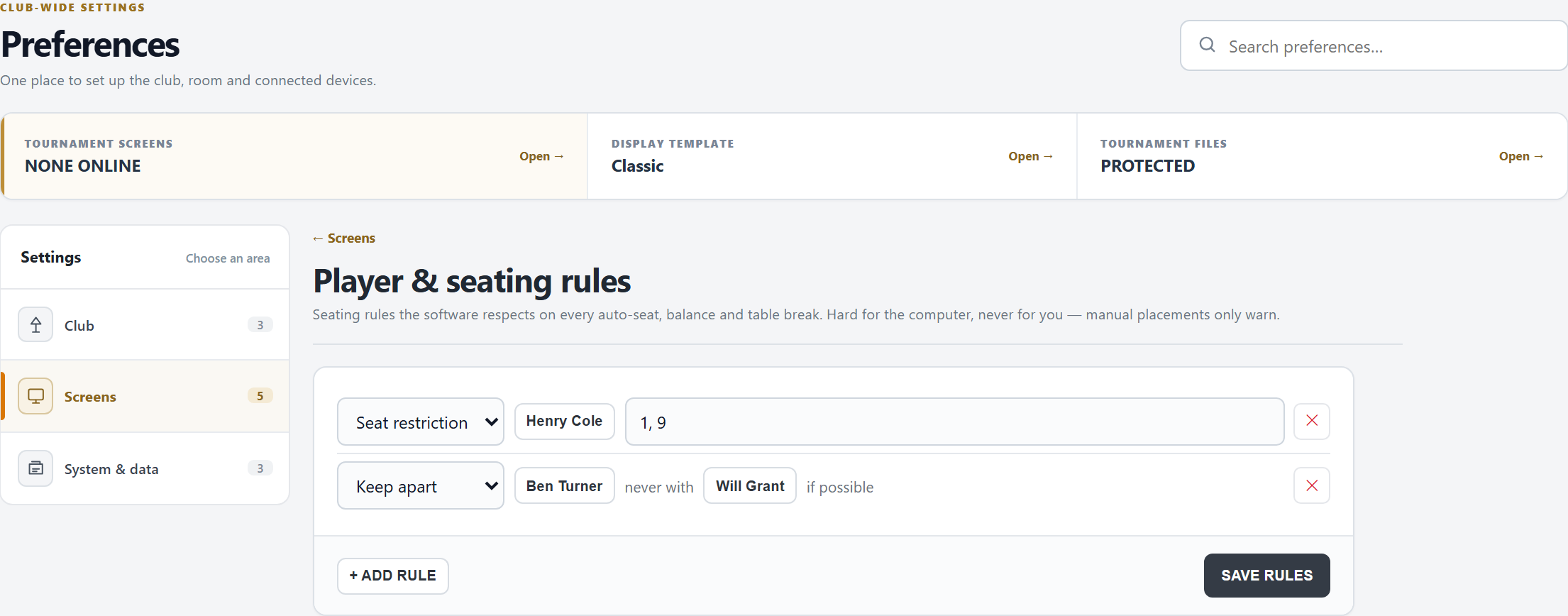
- Also opened from the Tables tab (⚙ Player & seating rules). Club-wide: every tournament follows them.
- Seat restriction: the seats a player may get:
1, 9(seat 1 or 9 at any table) orT3S5(table 3, seat 5). - Keep apart: two players never at the same table, if possible.
- + ADD RULE, then SAVE RULES.
- How FeltTD uses them: auto-seat only gives a restricted player an allowed seat, or says none is free; it avoids a kept-apart table when it can. Balancing only moves players to a seat they may have. The break planner seats the restricted players first and warns in amber where a rule is not met. Your own moves are never blocked: you are the TD.
Good to know
- Most of Preferences is saved on the tournament PC itself. Another device can look at these pages and says so on top; screens can be assigned and renamed from a device with full TD rights, and quick announcements and hotkeys work from any paired device.
- The club's settings are in the backup, so they move with the club; the sound library does not (copy it by hand).
- A test or practice tournament never appears on the club page or the widget, not even when you pick it for the widget.